




How to Start a Digital Product Business with Zero Coding Knowledge

How to Start a Digital Product Business with Zero Coding Knowledge (Complete 10-Point Guide)
Digital products — ebooks, templates, courses, planners, presets, and guides — are one of the few businesses you can start with no inventory, no shipping, no coding, and almost no upfront cost. Profit margins are typically 90%+ because you build the product once and sell it unlimited times. Below is a detailed, step-by-step breakdown of how to go from zero to your first sale, and then to a repeatable business.
1. The Fastest Way to Start Selling Digital Products
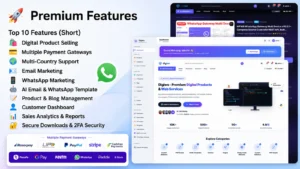
Most beginners waste weeks “preparing” instead of launching. Here’s the fastest realistic path:
Day 1–2: Pick a narrow product. Don’t start with “an online course.” Start with something small and shippable in under 48 hours: a single template, a checklist, a swipe file, a one-topic guide, or a resource pack. Small products teach you the entire sales process (creation → listing → checkout → delivery) quickly, and you can expand later.
Day 2–3: Build a rough version 1. Use tools you already know — Google Docs, Canva, Notion, or a spreadsheet. Don’t wait for it to be beautiful. A clean, useful, slightly plain product that solves a real problem outsells a gorgeous product that doesn’t.
Day 3: List it on a no-code storefront. Gumroad, Payhip, or Sellfy let you upload a file, set a price, and go live in under an hour — no website, no code, no design skills required.
Day 4–7: Get your first sale. Share it with your existing network, post in 2–3 relevant online communities, and ask for honest feedback.
Why this works: you validate demand with real money before investing more time. If nobody buys the small version, you’ve saved yourself from building a bigger version of something people don’t want. If it sells, you now have proof of demand, a template process, and your first customer feedback to guide version 2.
2. How to Capture Future Market Trends Before They Peak
Being early to a rising trend is far more profitable than fighting for space in a saturated one. Here’s how to spot momentum early:
- Google Trends: Search your niche keywords and set the timeframe to “past 12 months.” Look for an upward slope, not a flat or declining line.
- Social listening: Check trending hashtags and audio on TikTok/Instagram Reels in your niche, and note recurring themes in the comments — comments often reveal exactly what people wish existed.
- Community mining: Reddit, Facebook groups, and Discord servers in your niche are full of people asking “does anyone know a template/tool for X?” — that question is a product idea.
- Marketplace signals: On Etsy, Gumroad’s Discover, or Creative Market, sort by “best selling” or “trending” in your category to see what’s already gaining traction — then find your own angle instead of copying directly.
- Search-volume tools: Free tools like Google Keyword Planner or Ubersuggest show you how many people search a term monthly, which tells you if a “trend” has real search demand behind it.
Durable categories to watch in 2026: AI-assisted templates and prompt packs, personal finance and budgeting tools, niche online courses, Notion/productivity systems, social media content packs, and print-at-home planners. These categories have repeatedly shown consistent, non-seasonal demand.
3. How to Use AI to Generate Digital Products (No Design or Coding Needed)
AI tools now let a single person do the work that used to require a writer, designer, and editor. Here’s how to apply them by product type:
Ebooks and guides: Use an AI writing assistant to generate a detailed outline first, then draft section by section. Fact-check every claim, rewrite it in your own voice, and add your personal experience or examples — this is what makes it genuinely yours and not generic filler.
Templates, planners, and worksheets: Use Canva (free tier is enough to start) combined with AI to generate copy, structure, and even color palette ideas. Canva’s drag-and-drop editor requires zero design skill.
Online courses: Use AI to build your module outline and script each lesson. Record yourself talking through the material with just your phone or a laptop webcam — polish isn’t the priority for a first version, clarity is. AI voice tools can also generate narration if you’d rather not appear on camera.
Visual assets (icon packs, social templates, presentation decks): Use AI image generation for raw visual elements, then assemble and refine them in Canva or Figma, both of which are entirely no-code.
Spreadsheets and trackers: Describe the calculations you want in plain language to an AI assistant, and it can write the formulas for you to paste directly into Google Sheets or Excel — no formula knowledge required.
Important guardrail: treat AI output as a fast first draft, not a finished product. Review everything for accuracy, remove anything generic or repetitive, and make sure the final product reflects real expertise or a real, useful outcome — buyers can tell the difference between a lightly-edited AI dump and a genuinely useful resource, and reviews will reflect it.
4. How to Set Up Your Business on a No-Code Selling Website
You don’t need a developer or a website builder background to launch a real storefront. Here’s a comparison of common beginner-friendly options:
| Platform | Best for | Fees | Notes |
|---|---|---|---|
| Gumroad | Creators, first-time sellers | ~10% per sale | Extremely fast setup, built-in audience discovery |
| Payhip | Ebooks, software, memberships | Free plan + 5% fee, or paid plans with 0–2% | Clean checkout, EU VAT handling built in |
| Podia | Courses, memberships, communities | Monthly subscription | All-in-one: website, email, checkout |
| Sellfy | Digital downloads + print-on-demand | Monthly subscription | Good for creators selling merch too |
| Etsy | Design assets, printables, templates | Listing fee + transaction fee | Built-in shopper traffic, strong for visual products |
| WordPress + Easy Digital Downloads | Sellers who want full ownership/branding | Hosting cost + plugin (free/paid tiers) | More setup, but you own the platform entirely |
If you’re using a specific platform such as digiws.com, I wasn’t able to independently verify details about that particular site, so follow its own official signup and help documentation for exact steps — the general setup flow below applies to virtually all of these platforms:
- Create your seller account and verify your email.
- Upload your product file(s) — PDF, ZIP, video, or whatever format fits your product.
- Write your listing:
- Title: specific and benefit-driven (e.g., “30-Day Budget Planner for Freelancers” beats “Budget Template”).
- Description: lead with the outcome/benefit, then list what’s included.
- Cover image: even a simple Canva mockup makes a listing look far more professional.
- Set your price (see Point 8 for pricing strategy).
- Connect payment processing — most platforms integrate PayPal and Stripe directly, so money goes straight to your account.
- Publish and test the checkout yourself before sharing it publicly, to confirm delivery works correctly.
Most sellers can go from account creation to a live, purchasable product page in under an hour.
5. How to Launch on a Website for Maximum Benefit
The launch moment matters more than most people expect — a coordinated launch can outsell weeks of passive listing. To get the most out of it:
- Build anticipation first. Even a short waitlist (an email list, a “coming soon” post, or a story countdown) creates buyers who are ready to purchase on day one.
- Offer a launch incentive. A limited-time discount, bonus resource, or lower “founding member” price creates urgency and rewards early buyers.
- Launch across every channel at once. Post to your email list, social platforms, and relevant communities on the same day so momentum compounds instead of trickling out.
- Ask for testimonials immediately. Reach out to your first 5–10 buyers directly and ask for a quick review — early social proof strongly influences the next wave of buyers.
- Ride platform algorithms. New listings and posts are typically shown to more people than older ones, so a concentrated launch gets more organic reach than a slow trickle of promotion.
6. How to Sell Fast: Getting Your First Buyers Without a Big Following
You don’t need thousands of followers to make your first sales. Faster paths include:
- Niche communities: Post in Facebook groups, subreddits, and Discord servers where your ideal buyer already spends time — always read and follow each community’s self-promotion rules first.
- Direct outreach: Message 10–20 people who clearly match your target customer and personally invite them to check it out; a genuine 1:1 message converts far better than a broadcast post.
- Urgency and scarcity: A “first 20 buyers get 30% off” offer pushes hesitant buyers to act now instead of “later” (which often means never).
- Bundling: Add a small bonus (a checklist, template, or short video) to increase perceived value without discounting your core price.
- Warm network first: Friends, past coworkers, or existing clients are usually your fastest and easiest first sales — and they’re often willing to leave a review, which helps convert the next round of strangers.
- Affiliate or referral incentive: Offer a commission to a few people with relevant audiences to promote your product for you — this turns other people’s reach into your sales channel.
7. How to Find Your Category or Niche
Choosing the right niche is the single highest-leverage decision in this business. Validate before you build:
- List your knowledge base. Write down 5–10 topics you already understand well, have experience in, or are genuinely curious enough about to research deeply.
- Check for existing demand. Search those topics on Etsy, Gumroad’s Discover page, and Google. If similar products are already selling, that’s a good sign — it means people are already spending money in that category.
- Look for active conversation. Search Reddit and Facebook groups for your topic. Active discussion, questions, and complaints indicate real, ongoing demand (not just curiosity).
- Narrow your angle. “Templates” is too broad. “Notion templates for freelance photographers to track clients and invoices” is specific enough to stand out in a crowded market and easier to market to a clear audience.
- Check competition level. A few competitors is healthy — it proves the market exists. Dozens of near-identical, well-reviewed products in the exact same angle is a signal to find a more specific niche within it.
8. How to Price Your Product to Convert
- Research first. Look at 5–10 similar products in your category and note the price range — this tells you what the market already expects to pay.
- Price on value, not effort. A template that saves someone 10 hours of work can reasonably cost more than a template that took you 10 hours to make, because buyers pay for the outcome, not your labor.
- Use tiered pricing. Offer a basic version, a standard version, and a premium bundle (e.g., template only / template + video walkthrough / template + walkthrough + 1:1 email support) to capture different budgets from the same audience.
- Start slightly lower at launch. A modest launch discount rewards early buyers and helps you accumulate reviews faster, which supports a price increase later.
- Avoid pricing too low. Extremely cheap products can signal low quality and attract buyers who are more likely to ask for refunds or leave lukewarm reviews — price to reflect real value, not just to “seem affordable.”
9. How to Build Trust Without a Track Record
New sellers lose sales not because the product is bad, but because buyers have no way to know that yet. Fix this with visible trust signals:
- Clear refund policy. Stating your policy plainly (even a simple “no questions asked, 7-day refund”) reduces buyer hesitation significantly.
- Preview or sample content. A few free pages of an ebook, a sample module of a course, or a preview image of a template lets buyers see quality before paying.
- Social proof, even small. Your first 3–5 reviews matter disproportionately — actively ask satisfied buyers to leave one.
- A real “About” section. A short, honest note about who you are and why you created the product builds far more trust than generic marketing copy.
- Responsive support. Answering questions quickly (even a simple “reply within 24 hours” habit) turns hesitant browsers into buyers and reduces refund requests.
10. Turn One Product into a Repeatable Business
Your first product is the beginning, not the finish line. To build a sustainable business from it:
- Mine customer feedback. Questions and requests from buyers are essentially a roadmap for your next product — build what they’re already asking for.
- Build an email list. Every buyer should be added to a list (with consent) so future launches cost you nothing to promote.
- Repurpose across formats. A guide can become a mini-course; a template can become a bundle; a course can become a membership with ongoing content.
- Create a simple product ladder. A low-cost entry product, a mid-tier core product, and a premium offer let the same audience spend more with you over time without you needing new customers for every sale.
- Automate what you can. Most platforms handle payment, delivery, and even basic email follow-ups automatically once set up — this is what lets a digital product business scale without you trading more hours for more revenue.
Bottom Line
You don’t need to code to build a real digital product business. You need one validated idea, a simple no-code storefront, AI tools to speed up creation, and a consistent, repeatable way to reach buyers. Start small, launch fast, listen closely to your first customers, and let their feedback — not guesswork — decide what you build next.